Automatic ground control points.
Any map, any projection, in under a minute.
Monarcha identifies the coordinate system, detects ground control points, and aligns scanned maps, aerial photographs, and legacy plans to real-world coordinates. No manual GCP picking. 4,000+ EPSG codes. Sub-meter accuracy on modern basemaps.
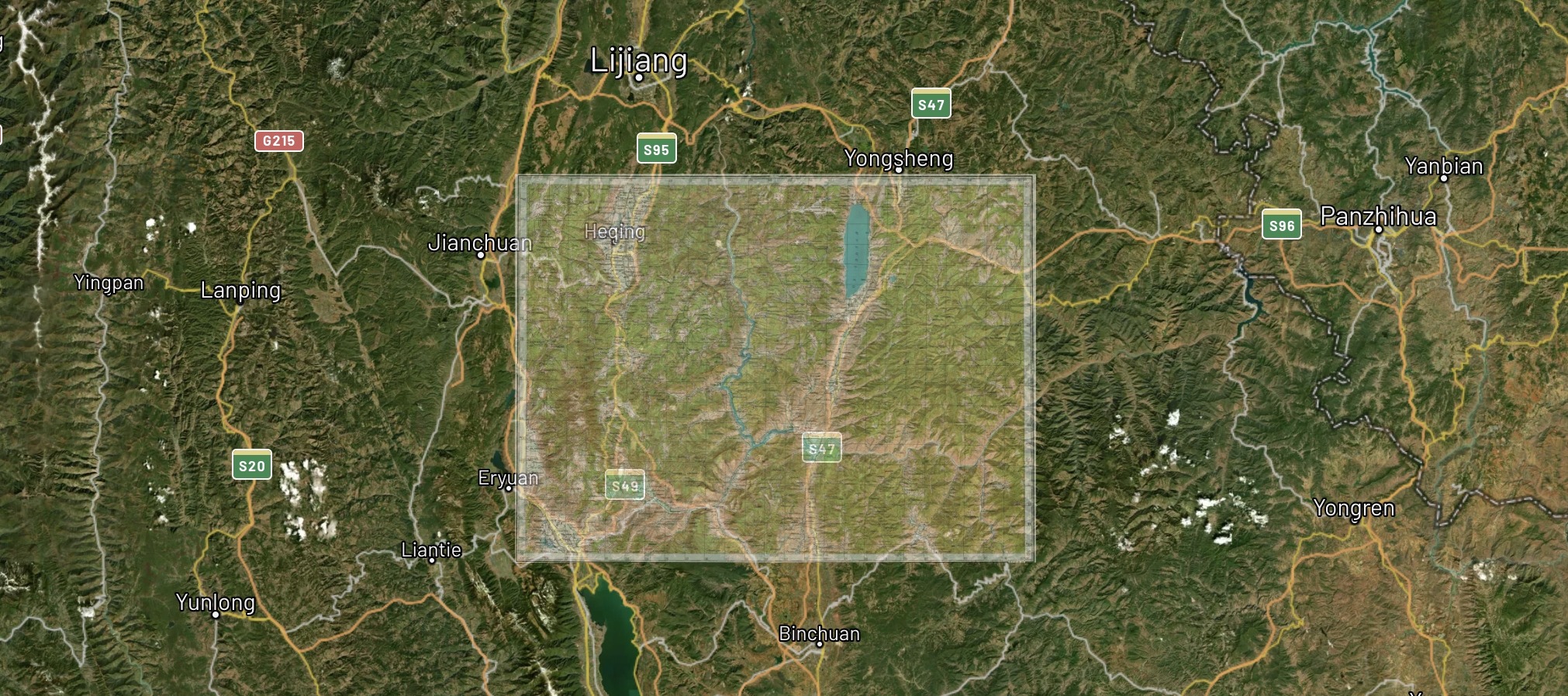
USGS map
Layers
Automatic GCPs
No manual point picking
4,000+ EPSG codes
UTM, state plane, custom grids
Sub-meter accuracy
On modern basemaps
Under 60 seconds
Typical sheet
Batch thousands
Single run
On-prem available
Private cloud or SOC 2 SaaS
Fast processing
Upload a scan and get a georeferenced output in under 60 seconds for typical sheets.
Automatic GCPs
Ground control points are detected and matched against the basemap without manual intervention.
Broad projection support
UTM, state plane, local mine grids, and 4,000+ EPSG codes, with automatic detection where the map gives hints.
Archive-scale batch
Process thousands of sheets in a single run, with per-point residuals on every output.
Built for the formats traditional georeferencing tools struggle with
Manual GCP picking works on clean modern scans. It breaks down on hand-inked plats, mylar overlays, faded blueprints, and continuous-tone aerials shot decades before any modern basemap existed. Monarcha is trained for that gap.
Hand-drawn plats
Subdivision plats, ALTA surveys, township and range sheets, easement exhibits, hand-inked field sketches.
Mylar and blueprint overlays
Engineering drawings reproduced on translucent media, blueprint copies, photocopied subdivisions.
Sun-faded zoning maps
Photocopied zoning amendments, redevelopment overlays, decades-old land use plans pulled from filing cabinets.
Scanned analog aerials
Historic black-and-white aerial photographs and orthomosaics from before modern GPS-corrected flights.
Geological and mine maps
Mine plans on local grids, geological survey sheets, drill collar maps, geochemistry overlays.
Cadastral and parcel sheets
Historic county recorder books, parcel atlases, deed exhibits, recorded section corner ties.
Any map, any projection
Geological surveys, topographic sheets, mine grids, legacy cadastral maps. Monarcha identifies the coordinate system and transforms automatically. Supports UTM, state plane, local mine grids, and 4,000+ EPSG codes.
Also works with the Digitizer →Detected projection
Automatic control-point matching
AI-driven feature detection identifies grid intersections, marginal notations, landmark features, and text labels to compute accurate ground control points. Most maps need zero manual adjustments. For sensitive work, every point can be reviewed, edited, or rejected before export.
Control points
Flexible output formats
Export as GeoTIFF, Cloud-Optimized GeoTIFF, or bring results directly into ArcGIS, QGIS, or Leapfrog. Full CRS metadata preserved. Batch processing handles thousands of maps at once.
Export format
How it works
Three steps from a paper scan to a spatially-accurate digital layer.
Upload your scan
Drag and drop a scanned map in TIFF, PNG, JPEG, or PDF format. Batch upload is supported.
AI identifies the projection and control points
Monarcha reads marginal notations, grid ticks, and map metadata to determine the CRS, then detects and matches ground control points against the basemap automatically.
Review residuals and export
See the overlay on a satellite basemap and the per-point residuals. Adjust if needed. Export as GeoTIFF, COG, or straight into ArcGIS or QGIS.
Monarcha vs. a manual georeferencing workflow
Manual georeferencing in ArcGIS, QGIS, or any other GIS still follows the same steps it did twenty years ago: a technician identifies ground control points, clicks them on the source and target, computes a transform, and inspects residuals. It works. It just doesn't scale.
Looking for a deeper read on when each approach is the right call? See QGIS Georeferencer vs automated AI georeferencing.
Frequently asked questions
Answers to the questions procurement teams, GIS directors, and archivists ask us most often.
What is AI georeferencing?
AI georeferencing is the automatic alignment of a scanned map, aerial photograph, or legacy plan to a real-world coordinate system. Instead of a GIS technician manually identifying ground control points and matching them to a reference dataset, a machine-learning model detects features on the source image, matches them against a basemap, and computes the transformation that places every pixel at its correct geographic position.
Do I need to pick ground control points manually?
No. Monarcha detects and matches ground control points automatically. Manual review and override is available for quality assurance on sensitive jobs, but the default workflow does not require any manual point picking.
What accuracy can I expect?
On modern basemaps with typical aerial, topographic, or cadastral input, Monarcha achieves sub-meter accuracy. Accuracy varies with the quality of the source scan, the age of the imagery, and the density of identifiable features. Every output ships with per-point residuals so you can audit the result before accepting it.
What coordinate reference systems are supported?
Monarcha supports more than 4,000 EPSG coordinate reference systems, including UTM, state plane, custom local mine grids, and historical national grids. The system identifies the projection automatically from marginal notations, grid ticks, and metadata when present, and falls back to user selection when the map gives no hints.
What file formats does it accept and produce?
Input: TIFF, GeoTIFF, PDF, JPEG, and PNG. Output: GeoTIFF, Cloud Optimized GeoTIFF (COG), and other georeferenced raster formats with full CRS metadata preserved. Results drop directly into ArcGIS, QGIS, and any GIS that reads standard georeferenced rasters.
Can it process archives at scale?
Yes. Monarcha is built for batch runs of thousands of sheets in a single job. Customers use it to process entire county archives, mineral exploration libraries, and historical aerial collections that would take a manual team months to handle.
Is on-premises or private cloud deployment available?
Yes. Monarcha offers private cloud and on-premises deployments for government customers and any organization with data sovereignty or sensitivity requirements. The platform is SOC 2 compliant.
How does it integrate with ArcGIS and QGIS?
Monarcha exports standard GeoTIFF and Cloud Optimized GeoTIFF files that load natively into ArcGIS, QGIS, Leapfrog, and any GIS that supports georeferenced rasters. No proprietary format, no special importer required.