
What is Georeferencing? A Complete Guide to Digital Map Alignment
Introduction
Every day, businesses across industries, from mining companies to civil engineers to title insurance firms, need to work with historical maps, geological surveys, and legacy documents. But there's a problem: these maps exist in a world without coordinates. They can't be overlaid on modern GIS systems, cross-referenced with satellite imagery, or integrated into digital workflows.
This is where georeferencing comes in.
What is Georeferencing?
Georeferencing is the process of taking a map, image, or document and assigning it real-world geographic coordinates. It transforms a static image into a spatially-aware dataset that can be accurately positioned on Earth's surface and integrated with other geospatial data.
Think of it like this: you have a hand-drawn map from 1952 showing mineral deposits in a mining region. Without georeferencing, it's just a picture. With georeferencing, that map becomes a precise layer you can overlay on modern satellite imagery, matching exact locations to within meters of accuracy.
Why Georeferencing Matters
The applications are vast:
Mining & Exploration: Historical geological maps contain decades of survey data, core sample locations, and mineral deposit information. Companies need to digitize and georeference these documents to inform modern exploration programs, avoid re-surveying known areas, and comply with regulatory requirements.
Title Insurance: Property records, subdivision plats, and historical deeds often exist only as paper documents or scanned PDFs. Georeferencing these materials allows title companies to understand property boundaries, identify encumbrances, and assess risk more accurately.
Civil Engineering: Infrastructure projects require understanding historical utility maps, drainage plans, and development records. Georeferenced historical documents prevent costly mistakes like cutting through underground utilities or building on unstable ground.
Utilities & Telecommunications: Decades-old infrastructure maps need to be brought into modern asset management systems. Georeferencing enables utilities to maintain accurate records of cable routes, pipeline locations, and easements.
Government & Urban Planning: Historical zoning maps, environmental surveys, and land use documents inform current policy decisions and development planning.
The Traditional Georeferencing Workflow
The conventional approach to georeferencing is painstakingly manual. Here's what it typically involves:
Step 1: Document Preparation
First, you need a high-quality digital scan of your physical map or document. This scan must be clean, high-resolution, and properly formatted for GIS software.
Step 2: Identify Ground Control Points (GCPs)
This is where the real work begins. A GIS technician must:
Carefully examine the historical map
Identify recognizable features that still exist today (road intersections, building corners, natural features)
Find those same features on a modern base map or satellite imagery
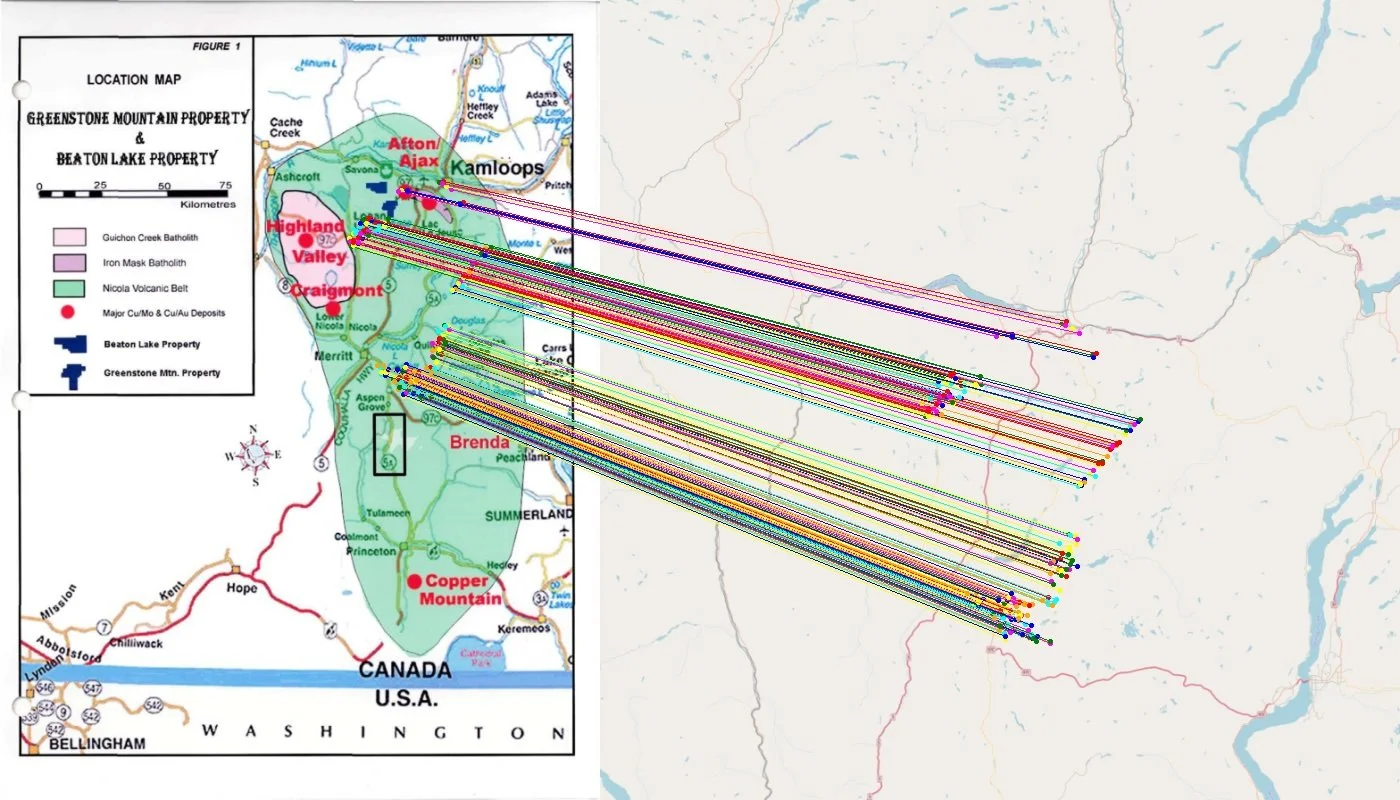
Manually place control points on both the historical and modern map
This process requires significant geographic knowledge and careful attention to detail. Place a point incorrectly, and your entire map could be skewed by hundreds of meters.
Step 3: Select a Transformation Model
Different transformation algorithms (affine, polynomial, spline) are used depending on the map's distortion characteristics. Choosing the wrong transformation can introduce systematic errors.
Step 4: Apply the Transformation
GIS software uses your control points to warp the historical map onto real-world coordinates. This process calculates how to stretch, rotate, and adjust the image to match reality.
Step 5: Assess Accuracy
Check the Root Mean Square Error (RMSE) to ensure your georeferencing meets accuracy requirements. If errors are too high, you may need to add more control points or start over.
Step 6: Export and Integrate
Finally, export the georeferenced map in a format compatible with your GIS system (GeoTIFF, for example) and integrate it into your spatial database.
The Problem: Time and Expertise
Here's the challenge: this process is time-intensive when done by skilled GIS technicians. For organizations with archives containing hundreds or thousands of historical documents, the work becomes impossible:
Many organizations simply can't justify this investment, leaving valuable historical data locked away in filing cabinets and legacy archives. Critical information about subsurface conditions, historical boundaries, and past survey work remains inaccessible.
The AI Revolution in Georeferencing
This is where modern AI technology fundamentally changes the equation.
At Monarcha, we've built a system that automates the entire georeferencing pipeline using computer vision and deep learning. Instead of manual control point identification and transformation, our platform:
Automatically extracts features from historical maps and documents using vision language models that understand cartographic elements, text, and spatial relationships
Identifies matches between historical and modern geospatial data without human intervention, using AI models trained specifically on map matching tasks
Computes optimal transformations that achieve sub-meter accuracy even on distorted, hand-drawn maps
Processes documents at scale on GPU infrastructure, reducing turnaround time from hours to minutes
The key insight is that georeferencing is fundamentally a computer vision problem. Modern AI models can recognize landmarks, understand spatial relationships, and match features across different map projections far faster than humans, and often with equal or better accuracy.
What This Means for Your Business
Speed: Process entire archives in days instead of months. Our customers regularly georeference 100+ documents in the time it would take to manually process 5-10.
Cost: Eliminate the need for specialized GIS labor on repetitive georeferencing tasks. Your team can focus on analysis and decision-making rather than manual data preparation.
Accuracy: Achieve sub-meter accuracy on historical documents, even those with significant distortion or limited reference information.
Accessibility: Make your historical archive queryable, searchable, and usable in modern digital workflows. Every engineer, geologist, or analyst can access georeferenced historical data without waiting weeks for GIS support.
The Philosophy: Automation Enables Analysis
We believe the future of geospatial work isn't spending hours on mechanical tasks, it's spending time on insight and decision-making.
Georeferencing is necessary but not sufficient. The real value comes from what you do with georeferenced data: identifying mineral exploration targets, assessing property risk, planning infrastructure projects, managing assets. Every hour spent manually placing control points is an hour not spent on these higher-value activities.
AI doesn't replace geospatial expertise, it amplifies it. By automating the tedious, repetitive aspects of map digitization, we free up skilled professionals to focus on the work that actually requires human judgment and domain knowledge.
Looking Forward
The geospatial industry is sitting on an enormous archive of historical knowledge. Decades of surveys, decades of maps, decades of hard-won field data. Most of it is inaccessible because digitization is too expensive and time-consuming.
AI-powered georeferencing changes this calculus entirely. What was once a months-long project becomes a week-long project. What was once prohibitively expensive becomes routine. What was once locked in paper archives becomes searchable, analyzable, and immediately useful.
This isn't about replacing GIS professionals, it's about giving them superpowers.
Ready to unlock your historical map archives? Learn how Monarcha's AI georeferencing platform can process your documents in minutes instead of months. Contact us to schedule a demo.